

AI Technician

Led the end-to-end design, research, and stakeholder alignment for
AI Technician, a tool enabling IT teams to automate remote support tasks.
Overview
Role
Senior Product Designer, Lead IC
Timeline
2024 April – 2025 May
Outcome
Delivered an industry-first no-code automation tool that reduced customers’ manual task cycles by up to 80% and drove a 3x increase in average deal size.
The Problem Space
Business Context
LogMeIn Resolve is a platform that allows IT teams to remotely manage and troubleshoot workstations and servers.
Business objective: Secure a market-first advantage and unlock new revenue opportunities by embedding AI-driven intelligence into core IT workflows, reducing our customers’ operational overhead and reallocating human capital toward high-value strategic innovation.
The User Gap
IT agents already used our AI chatbot to diagnose issues, but because they still had to perform troubleshooting steps on the computers manually, the products’ AI adoption remained low and its value was limited.
Pain points: Users wanted to automate repetitive tasks, but scripting required high technical skills, and L1 agents struggled to verify results because they could not see how the code worked.
Hypothesis
We hypothesized that by providing an AI-powered, UI-based automation tool, we could decrease the users’ manual task cycles and bypass the technical scripting barrier for L1 agents.
Research
Research Methods
We conducted exploratory and evaluative research via surveys, remote interviews, as well as moderated testing using Figma prototypes, and later early functional builds.
The initial goal was to validate the product concept, followed by gathering usability feedback.
Research Impact
Key Finding
Impact
Missed customer productivity gains due to repetitive tasks
Validated customer need and business potential
Skill gaps block IT agent’s need for automation
Pivoted efforts from script-based to UI-based automations
Users struggle with an articulation barrier when trying to ask AI to do things
Prioritized roadmap items to reduce user reliance on manual prompting
Trust is key; AI needs guardrails on sensitive actions & permission handling
Prioritized roadmap items for AI safety, permission settings, and human-in-the-loop
Key Research Outcome
We secured buy-in for an MVP, establishing AI Technician as a key fiscal year innovation investment.
Ideation & Execution
In just a few weeks of net effort, we completed user and business validation, rapidly turning a business requirement into a functional MVP.
Concept Prototyping & Research
Developed early Figma concepts and Jobs-to-be-Done to prove viability and secure initial stakeholder buy-in through research.
Cross-Functional Work
I led a 3-day workshop with Product Managers and Engineering using "How Might We" statements and dot-voting to prioritize high-impact pain points, map technical constraints, and identify business and customer KPIs.
Rollout
We first launched a beta preview to mitigate the operational risk of unpredictable AI outcomes across thousands of endpoints. This allowed us to monitor real-world prompts and usage before General Access in under three months.
Post-Launch Optimization
We are currently enhancing feature engagement, leveraging gathered data to optimize SKU positioning, and expanding AI Technician’s role as a premium execution layer across the product.
The Solution
From Words to Automations
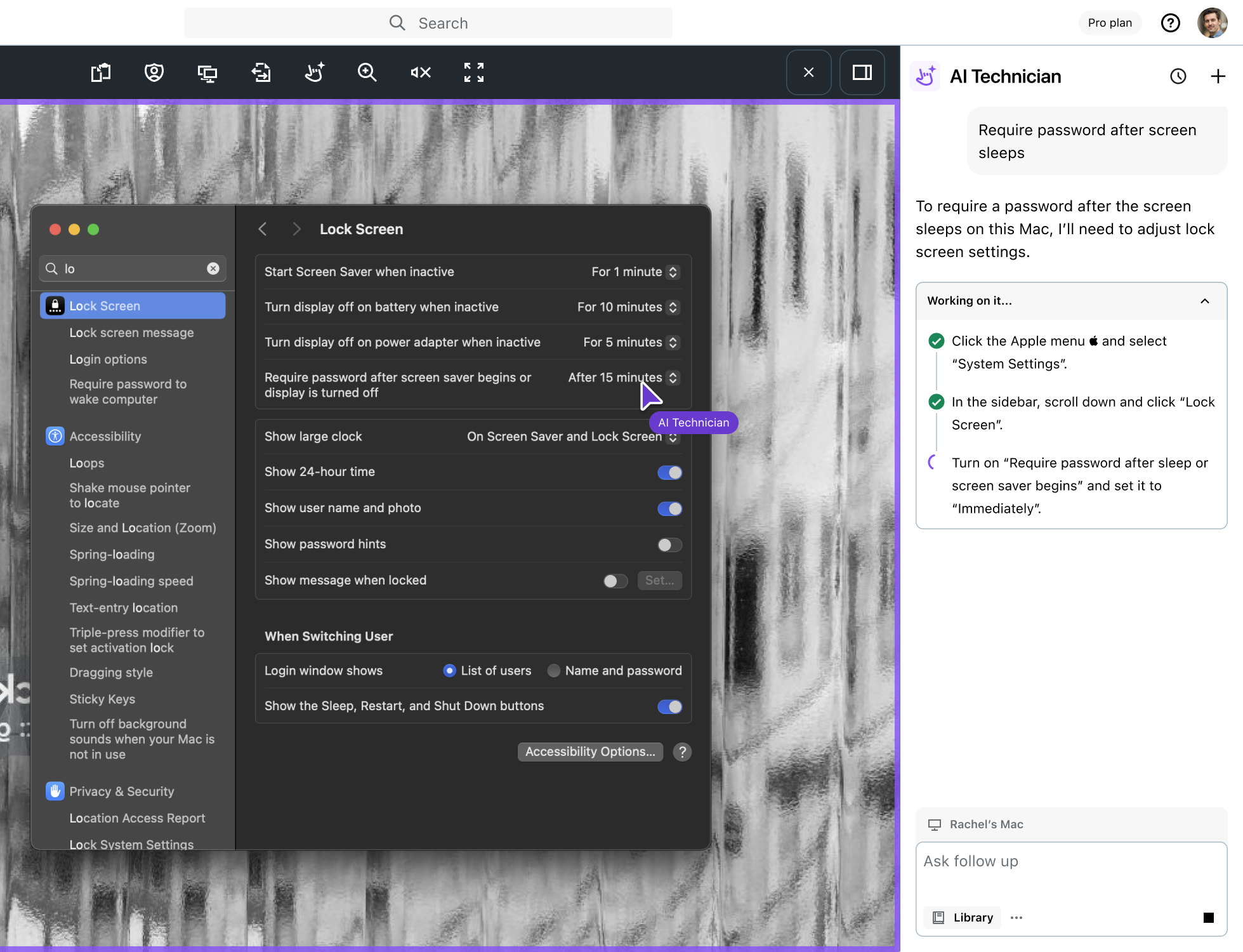
AI Technician is a conversational side panel accessible during remote sessions, allowing agents to diagnose and automate troubleshooting through simple prompts.
User needs addressed: It enables IT agents to automate tasks without scripting and offers real-time visual feedback to confirm that AI actions match user intent.
Reusable Automation Tasks
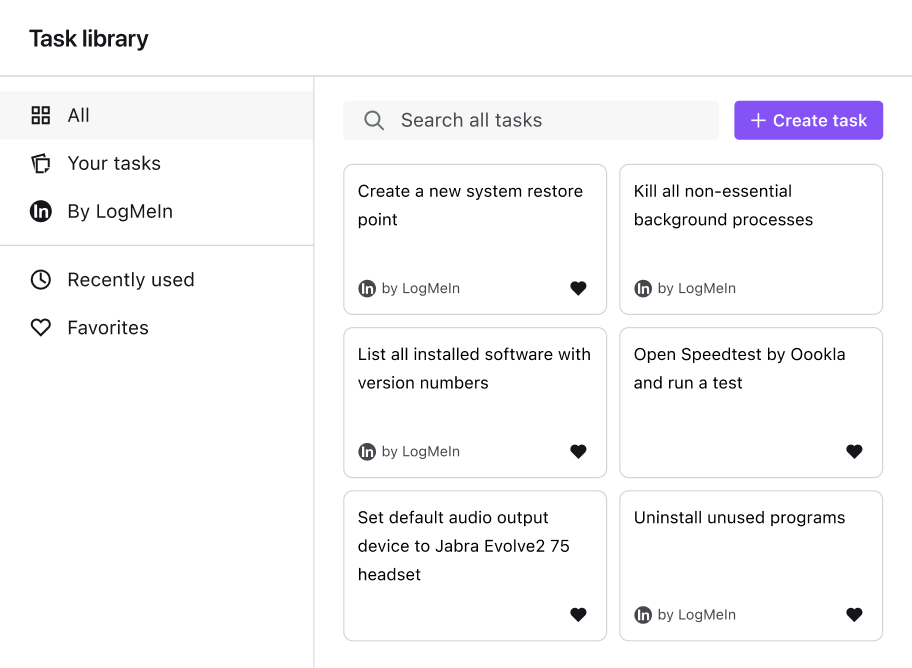
We delivered a library that enables users to save, share, and manage automation across their organization.
User needs addressed: The task library ensures reliable, consistent automation across the organization by allowing IT managers to approve and manage shared workflows. We also include default tasks to help pre-purchase and new users understand the tool’s value through safe, pre-vetted examples.
Permission Settings
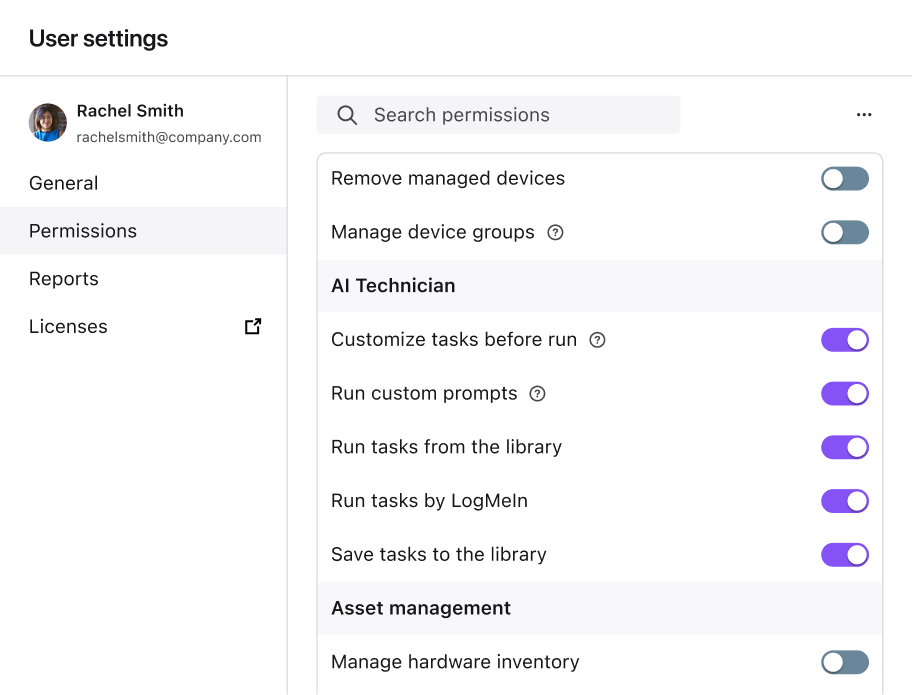
We introduced granular, user-level permission settings that enable organizations to control and restrict access to specific automation capabilities.
User needs addressed: This provides our customers in highly regulated sectors, like healthcare and government, with the strict oversight required to mitigate the operational risks of deploying automation tools across their production environments.
Reporting Features
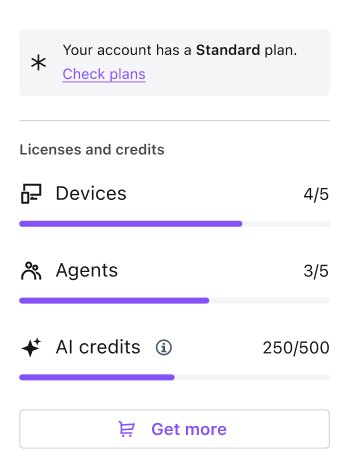
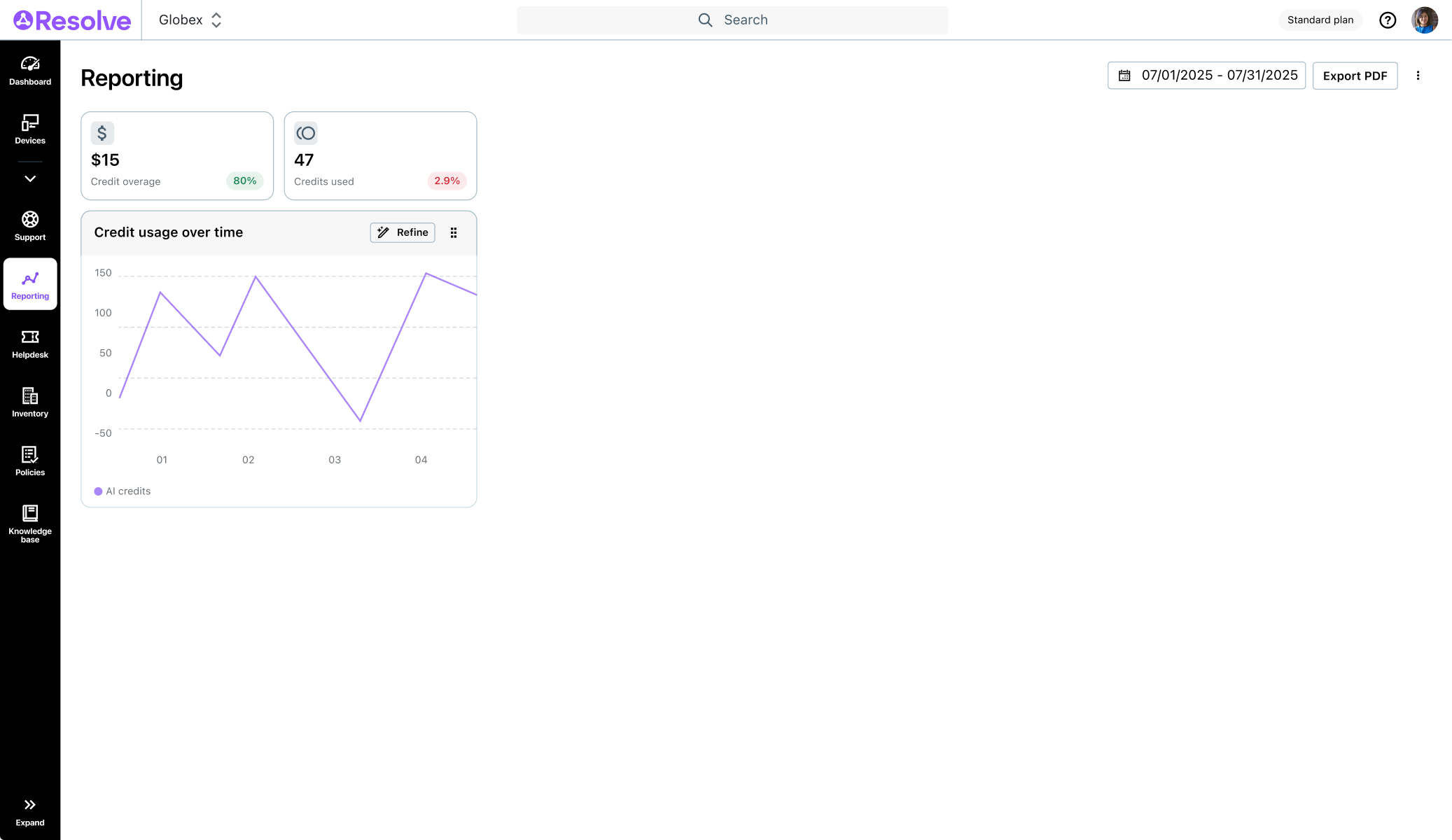
A comprehensive audit log tracks all AI Technician activity, usage metrics, and execution timing, allowing our customers to monitor usage.
User needs addressed: This provides our customers, including MSPs, with the transparency needed to quantify productivity gains, demonstrate clear ROI, and provide detailed activity reports to their clients.
Impact & Results
Leading indicators like adoption, combined with lagging reductions in resolution times, demonstrated sustained business impact.
Key Results
Average Deal Sizes
3x Increase (All Tiers)
Customer Efficiency
Up to 80% Increase
Average Adoption Rate
27.8%
User Task Completion Rate
98%
Industry Debut
AI Technician debuted at the SITS (Service Desk & IT Support) Conference in London (May 2025), serving as a primary lead generator while earning acclaim for easing agent scripting anxiety.
Takeaway
A primary realization was that high-fidelity static mocks fail to account for the non-deterministic nature of AI. Designing for probabilistic systems is complex.
Success requires early prototyping with unformatted, “messy” data to architect for the edge cases where user trust is most volatile.
Next Steps
We are planning to increase engagement by introducing additional entry points for AI Technician in other core flows and refining UI text to improve value perception.
We also aim to prioritize and build high-impact features informed by post-launch user insights and performance data.


AI Technician
Led the end-to-end design, research, and stakeholder alignment for
AI Technician, a tool enabling IT teams to automate remote support tasks.
Overview
Role
Senior Product Designer, Lead IC
Timeline
2024 April – 2025 May
Outcome
Delivered an industry-first no-code automation tool that reduced customers’ manual task cycles by up to 80% and drove a 3x increase in average deal size.
The Problem Space
Business Context
LogMeIn Resolve is a platform that allows IT teams to remotely manage and troubleshoot workstations and servers.
Business objective: Secure a market-first advantage and unlock new revenue opportunities by embedding AI-driven intelligence into core IT workflows, reducing our customers’ operational overhead and reallocating human capital toward high-value strategic innovation.
The User Gap
IT agents already used our AI chatbot to diagnose issues, but because they still had to perform troubleshooting steps on the computers manually, the products’ AI adoption remained low and its value was limited.
Pain points: Users wanted to automate repetitive tasks, but scripting required high technical skills, and L1 agents struggled to verify results because they could not see how the code worked.
Hypothesis
We hypothesized that by providing an AI-powered, UI-based automation tool, we could decrease the users’ manual task cycles and bypass the technical scripting barrier for L1 agents.
Research
Research Methods
We conducted exploratory and evaluative research via surveys, remote interviews, as well as moderated testing using Figma prototypes, and later early functional builds.
The initial goal was to validate the product concept, followed by gathering usability feedback.
Research Impact
Key Finding
Impact
Missed customer productivity gains due to repetitive tasks

Validated customer need and business potential
Skill gaps block IT agent’s need for automation
Pivoted efforts from script-based to UI-based automations
Users struggle with an articulation barrier when trying to ask AI to do things
Prioritized roadmap items to reduce user reliance on manual prompting
Trust is key; AI needs guardrails on sensitive actions & permission handling
Prioritized roadmap items for AI safety, permission settings, and human-in-the-loop
Key Research Outcome
We secured buy-in for an MVP, establishing AI Technician as a key fiscal year innovation investment.
Ideation & Execution
In just a few weeks of net effort, we completed user and business validation, rapidly turning a business requirement into a functional MVP.
Concept Prototyping & Research
Developed early Figma concepts and Jobs-to-be-Done to prove viability and secure initial stakeholder buy-in through research.
Cross-Functional Work
I led a 3-day workshop with Product Managers and Engineering using "How Might We" statements and dot-voting to prioritize high-impact pain points, map technical constraints, and identify business and customer KPIs.
Rollout
We first launched a beta preview to mitigate the operational risk of unpredictable AI outcomes across thousands of endpoints. This allowed us to monitor real-world prompts and usage before General Access in under three months.
Post-Launch Optimization
We are currently enhancing feature engagement, leveraging gathered data to optimize SKU positioning, and expanding AI Technician’s role as a premium execution layer across the product.
The Solution
From Words to Automations
AI Technician is a conversational side panel accessible during remote sessions, allowing agents to diagnose and automate troubleshooting through simple prompts.
User needs addressed: It enables IT agents to automate tasks without scripting and offers real-time visual feedback to confirm that AI actions match user intent.
Reusable Automation Tasks
We delivered a library that enables users to save, share, and manage automation across their organization.
User needs addressed: The task library ensures reliable, consistent automation across the organization by allowing IT managers to approve and manage shared workflows. We also include default tasks to help pre-purchase and new users understand the tool’s value through safe, pre-vetted examples.
Permission Settings
We introduced granular, user-level permission settings that enable organizations to control and restrict access to specific automation capabilities.
User needs addressed: This provides our customers in highly regulated sectors, like healthcare and government, with the strict oversight required to mitigate the operational risks of deploying automation tools across their production environments.
Reporting Features
A comprehensive audit log tracks all AI Technician activity, usage metrics, and execution timing, allowing our customers to monitor usage.
User needs addressed: This provides our customers, including MSPs, with the transparency needed to quantify productivity gains, demonstrate clear ROI, and provide detailed activity reports to their clients.
Impact & Results
Leading indicators like adoption, combined with lagging reductions in resolution times, demonstrated sustained business impact.
Key Results
Average Deal Sizes
3x Increase (All Tiers)
Customer Efficiency
Up to 80% Increase
Average Adoption Rate
27.8%
User Task Completion Rate
98%
Industry Debut
AI Technician debuted at the SITS (Service Desk & IT Support) Conference in London (May 2025), serving as a primary lead generator while earning acclaim for easing agent scripting anxiety.
Takeaway
A primary realization was that high-fidelity static mocks fail to account for the non-deterministic nature of AI. Designing for probabilistic systems is complex.
Success requires early prototyping with unformatted, “messy” data to architect for the edge cases where user trust is most volatile.
Next Steps
We are planning to increase engagement by introducing additional entry points for AI Technician in other core flows and refining UI text to improve value perception.
We also aim to prioritize and build high-impact features informed by post-launch user insights and performance data.
AI Technician
Led the end-to-end design, research, and stakeholder alignment for
AI Technician, a tool enabling IT teams to automate remote support tasks.
Overview
Role
Senior Product Designer, Lead IC
Timeline
2024 April – 2025 May
Outcome
Delivered an industry-first no-code automation tool that reduced customers’ manual task cycles by up to 80% and drove a 3x increase in average deal size.
The Problem Space
Business Context
LogMeIn Resolve is a platform that allows IT teams to remotely manage and troubleshoot workstations and servers.
Business objective: Secure a market-first advantage and unlock new revenue opportunities by embedding AI-driven intelligence into core IT workflows, reducing our customers’ operational overhead and reallocating human capital toward high-value strategic innovation.
The User Gap
IT agents already used our AI chatbot to diagnose issues, but because they still had to perform troubleshooting steps on the computers manually, the products’ AI adoption remained low and its value was limited.
Pain points: Users wanted to automate repetitive tasks, but scripting required high technical skills, and L1 agents struggled to verify results because they could not see how the code worked.
Hypothesis
We hypothesized that by providing an AI-powered, UI-based automation tool, we could decrease the users’ manual task cycles and bypass the technical scripting barrier for L1 agents.
Research
Research Methods
We conducted exploratory and evaluative research via surveys, remote interviews, as well as moderated testing using Figma prototypes, and later early functional builds.
The initial goal was to validate the product concept, followed by gathering usability feedback.
Research Impact
Key Finding
Impact
Missed customer productivity gains due to repetitive tasks
Validated customer need and business potential
Skill gaps block IT agent’s need for automation
Pivoted efforts from script-based to UI-based automations
Users struggle with an articulation barrier when trying to ask AI to do things
Prioritized roadmap items to reduce user reliance on manual prompting
Trust is key; AI needs guardrails on sensitive actions & permission handling
Prioritized roadmap items for AI safety, permission settings, and human-in-the-loop
Key Research Outcome
We secured buy-in for an MVP, establishing AI Technician as a key fiscal year innovation investment.
Ideation & Execution
In just a few weeks of net effort, we completed user and business validation, rapidly turning a business requirement into a functional MVP.
Concept Prototyping & Research
Developed early Figma concepts and Jobs-to-be-Done to prove viability and secure initial stakeholder buy-in through research.
Cross-Functional Work
I led a 3-day workshop with Product Managers and Engineering using "How Might We" statements and dot-voting to prioritize high-impact pain points, map technical constraints, and identify business and customer KPIs.
Rollout
We first launched a beta preview to mitigate the operational risk of unpredictable AI outcomes across thousands of endpoints. This allowed us to monitor real-world prompts and usage before General Access in under three months.
Post-Launch Optimization
We are currently enhancing feature engagement, leveraging gathered data to optimize SKU positioning, and expanding AI Technician’s role as a premium execution layer across the product.
The Solution
From Words to Automations
AI Technician is a conversational side panel accessible during remote sessions, allowing agents to diagnose and automate troubleshooting through simple prompts.
User needs addressed: It enables IT agents to automate tasks without scripting and offers real-time visual feedback to confirm that AI actions match user intent.
Reusable Automation Tasks
We delivered a library that enables users to save, share, and manage automation across their organization.
User needs addressed: The task library ensures reliable, consistent automation across the organization by allowing IT managers to approve and manage shared workflows. We also include default tasks to help pre-purchase and new users understand the tool’s value through safe, pre-vetted examples.
Permission Settings
We introduced granular, user-level permission settings that enable organizations to control and restrict access to specific automation capabilities.
User needs addressed: This provides our customers in highly regulated sectors, like healthcare and government, with the strict oversight required to mitigate the operational risks of deploying automation tools across their production environments.
Reporting Features
A comprehensive audit log tracks all AI Technician activity, usage metrics, and execution timing, allowing our customers to monitor usage.
User needs addressed: This provides our customers, including MSPs, with the transparency needed to quantify productivity gains, demonstrate clear ROI, and provide detailed activity reports to their clients.
Impact & Results
Leading indicators like adoption, combined with lagging reductions in resolution times, demonstrated sustained business impact.
Key Results
Average Deal Sizes
3x Increase (All Tiers)
Customer Efficiency
Up to 80% Increase
Average Adoption Rate
27.8%
User Task Completion Rate
98%
Industry Debut
AI Technician debuted at the SITS (Service Desk & IT Support) Conference in London (May 2025), serving as a primary lead generator while earning acclaim for easing agent scripting anxiety.
Takeaway
A primary realization was that high-fidelity static mocks fail to account for the non-deterministic nature of AI. Designing for probabilistic systems is complex.
Success requires early prototyping with unformatted, “messy” data to architect for the edge cases where user trust is most volatile.
Next Steps
We are planning to increase engagement by introducing additional entry points for AI Technician in other core flows and refining UI text to improve value perception.
We also aim to prioritize and build high-impact features informed by post-launch user insights and performance data.